FYI, a new release (2.10.0) of the VS Code Swift Extension was recently published. Some highlights include:
Added Swiftly toolchain management support .swift-version files, and integration with the toolchain selection UI (#1717)
Added code lenses to run suites/tests, configurable with the swift.showTestCodeLenses setting (#1698)
New swift.excludePathsFromActivation setting to ignore specified sub-folders from being activated as projects (#1693)))
Add a Generate SourceKit-LSP Configuration command that creates the configuration file with versioned schema pre-populated (#1726)
Optimizations to test explorer for test runs with many test cases (#1734)))
This release also has a number of bug fixes focusing on the Test Explorer and doc comments. To see details of all the updates, please see the changelog.
This release contains work contributed by our Google Summer of Code student, Priyambada Roul!
You can update to this version directly from VS Code. Additionally the vsix bundle for use with other IDEs is available from the release page: swift-vscode-2.10.0.vsix
Ahh… I just now saw the test coverage tool from the code lenses. Very cool!
Is there any way currently in Visual Studio to "collapse" or "focus" on my implementations that are not covered by a test? I see that my untested implementation code is highlighted in red… but I'm still kind of searching around manually through my code to find those red parts. Is there another step I am missing that just "shows me where the red is"? Something along those lines?
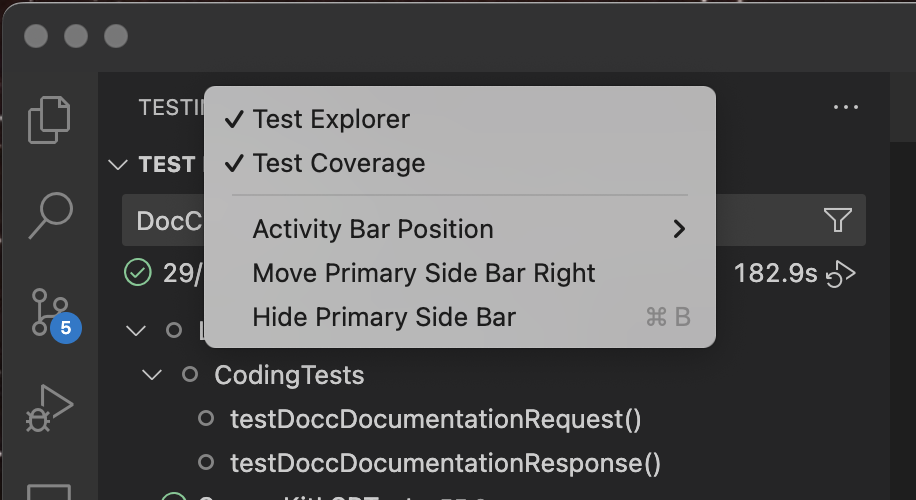
That view shows all of the sources in your project and the percentage of lines that were covered in each. If you don't see that then it might have been hidden or collapsed. You can right click on the Testing label to make sure that it's enabled:
Ahh… yes! I do have the Test Coverage panel visible and I see the percentages across my impl files. My question is what happens if "one file" is 1K or 10K or more LOC? Ok… so I know that 95 percent of code in my 10K LOC is covered… now I want to open that file and go right to the 5 percent that is uncovered.
Would there be any kind of a shortcut to "jump to next uncovered line" in an impl file? Maybe similar to "jump to next change" in a file with changes that have not been committed to source control?
I see what you mean now. Unfortunately, there doesn't appear to be a way to do that with VS Code currently. You can read more about VS Codes testing features in Microsoft's VS Code documentation. This might be something that the Swift extension could add, but it would be better done at the editor level I think.