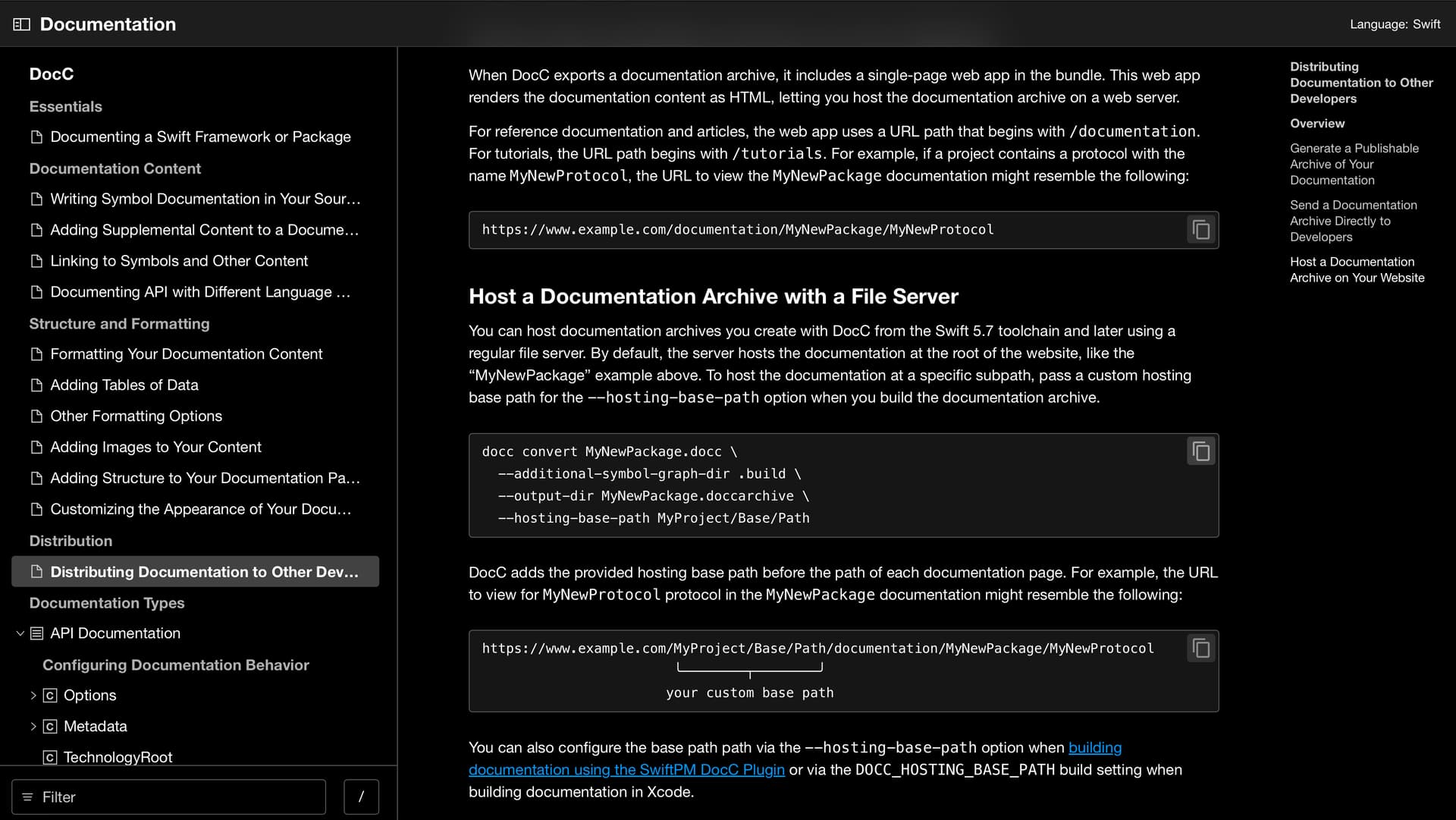
Following up from the pre-pitch investigation for adding some features/capabilities to rendering Code Blocks in DocC, I’d like to share a preview of what wem’d like to add:After doing the exploration, the feedback was very heavily in favor of enabling, by default, the copyToClip board feature - and visual affordance in the displayed code block. That said, we are hoping to push this beyond just copy to clipboard, and are now also exploring some further features.
To enable this, but not force us to choose a final position right now, we’ve updated the pull requests to enable this functionality behind a feature flag: –-enable-experimental-code-block
The two PRs work in conjunction:
The feedback on how to enable this also leaned heavily into following in Rust’s footsteps to annotate in additional detail around a code block. With the copy-to-clipboard enabled by default, there were a few use cases where we saw that an author might want to disable this on a specific code block, so we’ve flipped the logic.The end result is that an annotation (from the authoring perspective) looks something like:
```nocopy
print(“Hello, world!”)
```
The DocC PR includes a short video in the PR displaying how it works, and for convenience I converted that into an animated gif to show here:
Additionally, we wanted to show how this looked in light and dark mode:
We’d like to move forward with these PRs, merging them and experimentally enabling this - and follow the pull requests up with additional features for highlighting sections within a code block. We’re prototyping that effort now, but don’t have anything really yet ready to show.
I think shifting this behind an experimental feature flag makes this far less surprising for the next release, and I hope to have a few other options that we can iterate on to extend this kind of capability a bit, use it in depth, and look to refining it to a exposed default with the following release.
This immediate PR doesn’t, but it sets up to allow snippets to do the same thing. Since snippets are exposed in content as a directive, the equivalent of the annotations need to be aligned and added to the directive so that any such “code block metadata” can be included and exposed to DocC Render.
I love this! I have one question: is the copy button going to be visible for all code blocks at all times? It looks like it from the screenshots, but I would hope it will only show up while you’re hovering over a code block.
A correction to my earlier statement - with putting in the feature flag, is that feature flag is enabled, then the copy capability will be exposed on blocks that generate from @snippet directives as well (Jesse just verified this).
That’s where we started, but the feedback we got from the prepitch leaned us into enabling it by default, with the symbol always visible. The specific feedback was that hover and mobile usage, especially iPhone/iOS is awkward to get right. Add to that the feedback about the value being high enough, that we opted to have it on by default - at least when the experimental flag is enabled when generating the archive(s).
Have you looked into using media query like @media (hover: hover)? That would allow you to conditionalize the hover behavior on whether the input device is capable of hovering.
I’m a little surprised mobile is a consideration though. I feel like you're unlikely to copy a code block on mobile, but on the flip side, it is highly likely that code blocks will horizontally overflow because of the constrained screen width, leading to the copy button to obstruct a good chunk of it.
Thanks for the tip about using media queries. I ended up using @media (hover: hover) so the copy button only shows on hover for devices that support it and stays visible on devices that don't, like mobile. Here's how it's looking now:
From an aesthetic standpoint the copy icon does feel a little busy in the layout and perhaps too high up in the visual hierarchy. I wonder what it would look like if it were somewhat grayer unless the block was hovered.